
AI Model vs AI Coding Tool AI Model vs AI Coding Tool
🚀 AI Model vs AI Coding Tool: The Ultimate Guide to Understanding the Real Difference
Artificial intelligence is transforming software development at lightning speed. But many developers still confuse AI models with AI coding tools. Are they the same? If you use Claude inside another tool, do you get the same results as using Claude Code directly?
The short answer: No.
In this blog summary, we break down the real difference between AI models and AI coding tools, explain why Claude Code is gaining massive attention, and help you decide which AI coding solution fits your workflow.
🔍 What Is an AI Model?
An AI model is the brain behind artificial intelligence systems. It understands language, analyzes patterns, and generates responses.
Examples include:
- Claude (by Anthropic)
- GPT (by OpenAI)
- Gemini (by Google)
AI models are trained on billions of data points—books, websites, research papers, and code repositories. They learn patterns in language and logic, allowing them to answer questions and generate code.
However, here’s the key limitation:
AI models can think and respond—but they cannot act.
For example, if you ask an AI model:
“Create a new folder on my desktop.”
It will explain how to do it—but it cannot physically create the folder.
That’s where AI coding tools come in.
🛠 What Is an AI Coding Tool?
An AI coding tool gives AI models the ability to act inside your development environment.
If the AI model is the engine,
the AI coding tool is the vehicle.
Instead of just displaying code in chat, AI coding tools can:
- Analyze entire projects
- Create files automatically
- Write and edit code
- Execute tasks
- Review pull requests
- Automate workflows
This is the crucial difference most people overlook.
⚙️ Types of AI Coding Tools
There are three major categories of AI coding tools in today’s market:
1️⃣ Terminal-Based Tools (Autonomous Mode)
Examples:
- Claude Code
- Gemini CLI
These tools:
- Analyze your entire project
- Work autonomously
- Create and edit files
- Execute tasks based on high-level instructions
You simply state your goal. The AI handles the rest.
Think of this as self-driving mode.
2️⃣ Desktop IDE-Based Tools
Examples:
- Cursor
- Windsurf
- Antigravity
These operate inside code editors.
They:
- Suggest code snippets
- Offer autocomplete
- Assist while you manually write code
This is more like navigation assistance while driving yourself.
3️⃣ Web-Based IDE Tools
Examples:
- Replit
- Bolt
- Lovable
These:
- Require no installation
- Work directly in a browser
- Are ideal for beginners and quick prototypes
However, they often struggle with complex, large-scale projects.
🔄 Why Using the Same AI Model Doesn’t Mean Same Results
Here’s where things get interesting.
You can use the same Claude model in different tools—but your experience may differ dramatically.
Why?
Because each tool differs in:
- System prompts
- Agent loop design
- Context management
- Memory structure
- Tool integrations
- Token optimization
The model may be identical, but how it’s orchestrated changes everything.
It’s like using the same car engine in different vehicles—performance varies depending on design.
📈 The Shift from Prompt Engineering to Context Engineering
In the past, developers focused on “prompt engineering.”
Magic phrases like:
- “Think step by step.”
- “Act like a senior developer.”
But in 2026, the paradigm has shifted.
Now it’s about context engineering.
Context engineering means:
Providing the right information at the right time—without overwhelming the AI.
Research reports indicate that many AI agent failures occur not because the model is weak—but because context management fails.
When too much irrelevant data accumulates, the AI loses direction.
Claude Code stands out here.
🧠 Why Claude Code Is Gaining Massive Attention
Claude Code differentiates itself in two major ways:
1️⃣ Advanced Context Engineering
Claude Code includes:
- Dedicated memory files (e.g., project rules)
- Agent skills activation
- Sub-agent architecture
- Tool search optimization
- Token-efficient workflows
It feeds the AI only necessary information.
That leads to:
- Faster results
- Fewer errors
- Better code quality
2️⃣ Native Integration Advantage
Claude Code is built directly by Anthropic—the creators of Claude.
Other tools call Claude via public APIs.
Claude Code understands:
- Optimal prompt structures
- Ideal context layout
- Efficient token usage
- Model behavior nuances
Some developer comparisons suggest:
- ~5.5x fewer tokens used
- Faster execution
- Lower error rates
That’s a significant performance difference.
👨💻 The Evolution of the Developer Role
Two years ago:
Developers typed code manually and used AI for help.
Today:
AI writes most of the code.
Developers now:
- Define architecture
- Approve AI decisions
- Guide direction
- Optimize workflows
The role is shifting from “coder” to “AI architect.”
🎯 Which AI Coding Tool Should You Choose?
It depends on your goals.
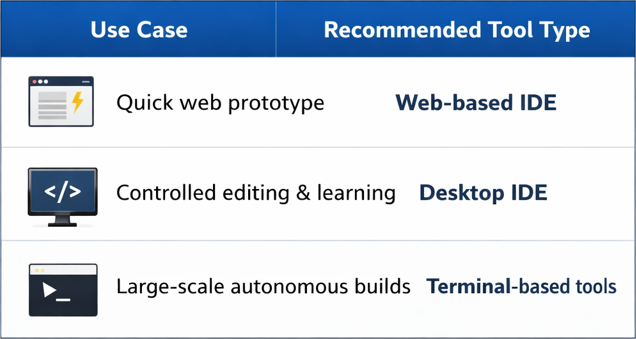
If you want maximum automation and scalability, terminal-based AI coding tools currently lead the trend.
🔗 External Resource
For deeper insights into AI agent design and context engineering principles, visit:
https://www.anthropic.com
💡 Final Takeaway
- AI models are engines.
- AI coding tools are vehicles.
- Same model ≠ same experience.
- Context engineering matters more than prompt tricks.
- Terminal-based autonomous tools represent the next evolution.
Understanding this difference is essential if you want to become an AI-native developer in the modern software era.